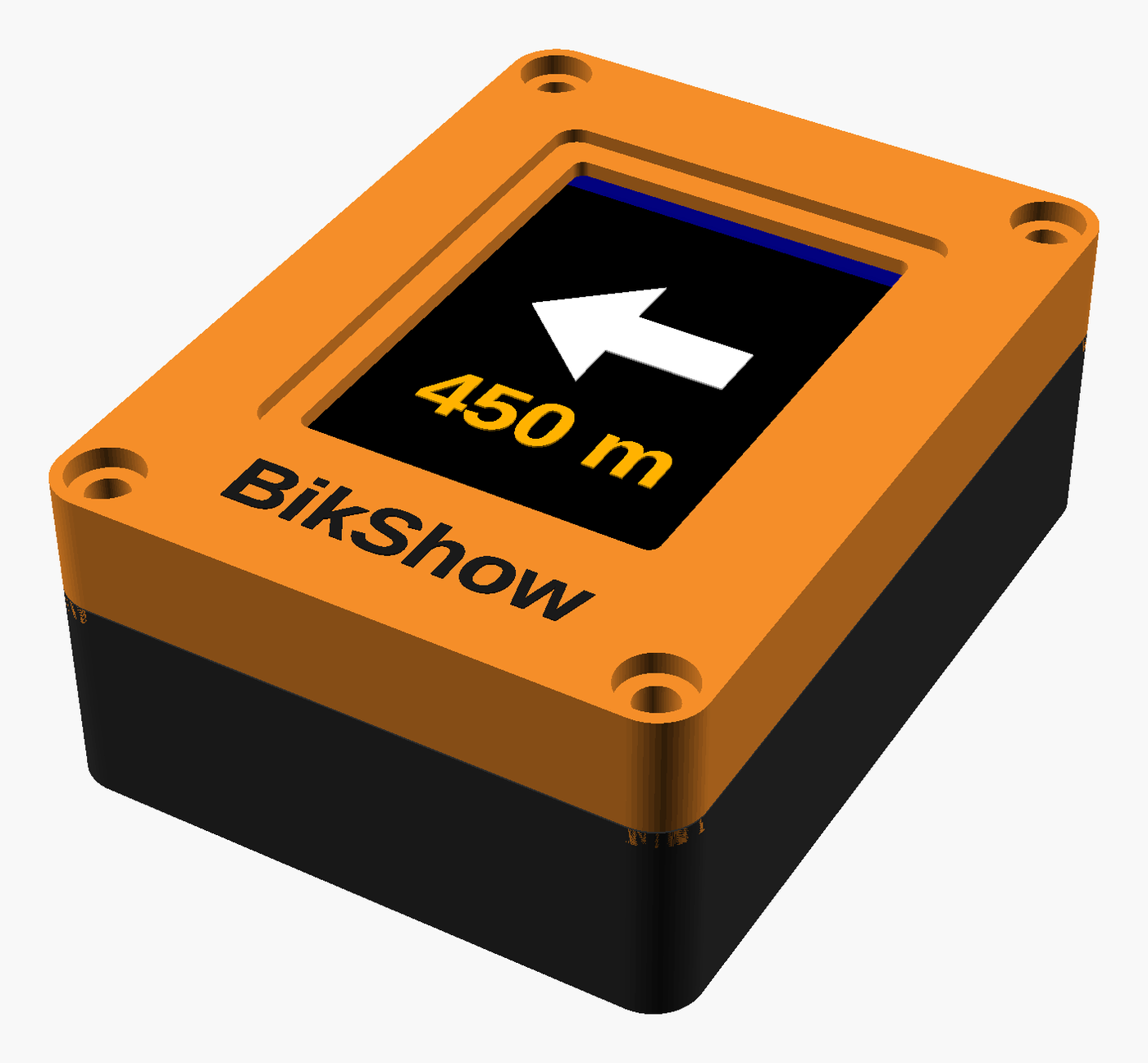
Navigation you can read at a glance
Start a route in Google Maps, put the phone away, and ride. BikShow shows the next turn, how far away it is, the street name and your arrival time on a bright display clamped to your bars.
- Follows Google Maps on your Android phone
- Powered by your bike's USB port — nothing to charge
- Rain-ready, and fits any handlebar
- No buttons. Connects by itself when you start navigating
See it working
Early prototype, before the case — the display exactly as it looks on the bars.
A real ride, recorded from the display: a left turn in 800 m, a slight right onto Gangaur Ghat Marg, a roundabout, a fork, and a reroute when the rider missed a turn. Under every arrow: the distance counting down, the street name, and the arrival time.
Every instruction Google Maps gives — left, right, slight turns, U-turns, roundabouts with the exit to take, merges, forks and arrival — has its own arrow, drawn large and clear.
Why put the turn on the handlebar?
A phone on the bars is a phone in the rain, in the sun, and in the way — and it is being shaken for the whole ride. Handlebar vibration is known to damage phone cameras: the optical image stabiliser is a tiny lens suspended on springs, and hours of buzzing through the bars can leave it permanently rattling, so every photo comes out blurred. A phone in your pocket, on the other hand, means glancing down at the wrong moment or missing the turn. BikShow gives you just the part of navigation you need while riding — the next manoeuvre — in a display built for the job, and lets the phone do everything else from your pocket or bag.
Saves your phone's camera
Phone makers warn that motorcycle and bike vibration can wreck the camera's optical stabilisation. BikShow takes the vibration so your phone doesn't have to.
Built to be glanced at
A turn arrow about 25 mm tall, big distance digits, high-contrast colours. As the turn gets close the arrow pulses so you notice without looking.
Nothing to press
No buttons, no menus. BikShow wakes up and connects when you start navigating and goes back to idle when you stop.
Three ways to see it
Minimal — arrow, distance and the turn spelled out. Detailed — adds the street name and ETA. Route — a progress view of the leg you are on. Switch any time in the app.
Kind to your phone
Your phone's screen stays off and the link is Bluetooth Low Energy, sending only when something changes. BikShow itself runs off the bike, so it costs your phone nothing.
Made for weather
Sealed stepped lid, a protected window over the screen, and a cable that leaves the case pointing down. Rain, road spray and dust stay outside.
Mounts anywhere
Standard action-camera mount: clamps to 22–32 mm bars, tilts to your eye line, comes off with one thumbscrew when you lock the bike up.
Small, tough, and out of the way
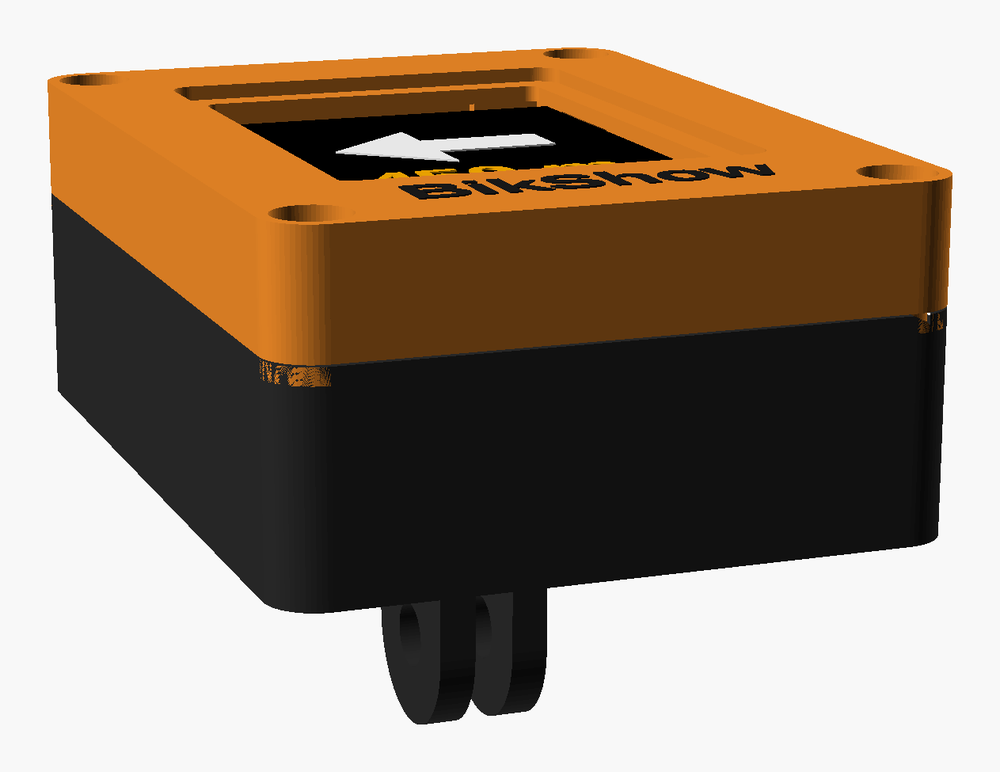
The whole unit is about the size of a deck of cards — 71 × 53 mm and 28 mm deep — and sits on a two-prong mount underneath, the same fitting used by action cameras. That means any of the countless handlebar, stem and out-front clamps made for cameras will hold it, on any bike you own.
The case splits into a base and a lid so the display can be swapped, and the mount is a separate piece so it can be changed for a different style later without replacing the unit.
Two versions
BikShow Colour
- Largest arrow and digits, in colour
- All three views: Minimal, Detailed and Route
- Animated idle screen when no route is active
BikShow Mono
- Crisp white-on-black, very readable in direct sun
- Minimal and Detailed views
- Slimmer, and the lightest on power
How you use it
-
Clamp it to the bars
Fit the mount to your handlebar or stem and tilt the screen toward you. One thumbscrew.
-
Plug into your bike's USB port
BikShow is powered by the bike, so there is no battery to remember. A small USB power bank works too if your bike has no port.
-
Pair once with the free companion app
Install the BikShow app on your Android phone, grant it the permissions it asks for, and pick your display from the list. It remembers the pairing from then on.
-
Ride
Start navigating in Google Maps exactly as you always have. BikShow picks up the route and shows each turn as it comes. Stop navigating and it goes quiet.
Specifications
| Display | 1.8" colour, 160 × 128 (Colour) / 1.3" monochrome, 128 × 64 (Mono) |
|---|---|
| Shows | Next manoeuvre, distance to it, street name, arrival time; roundabout exits; approaching-turn alert |
| Works with | Google Maps on Android 8.0 or newer, via the free BikShow companion app. iPhone support in development |
| Connection | Bluetooth Low Energy; connects automatically when navigation starts |
| Power | 5 V USB from the bike (or any USB power bank); no internal battery |
| Size | 71 × 53 × 28 mm, plus mount |
| Mount | Two-prong action-camera fitting; works with any camera handlebar clamp (22–32 mm bars) |
| Weather | Rain- and spray-resistant sealed case, downward cable exit |
| Controls | None on the unit; display mode is chosen in the app |
Good to know
- Android today, iPhone next. BikShow currently works with Android 8.0 or newer. iPhone support is in development.
- Google Maps only. It follows Google Maps navigation; other navigation apps are not supported.
- Turns, not lanes. It shows which way to go and how far, not which lane to be in.
- Not a replacement for looking where you are going. It is designed to be glanced at, like a bike computer.
Frequently Asked Questions
-
No. Once you have started the route, the phone can go in your pocket or bag with the screen off. Google Maps keeps navigating in the background as it normally does, and BikShow shows the turns.
-
Very little compared with Maps itself. BikShow is powered by the bike, not the phone, and the Bluetooth Low Energy link only sends something when the instruction changes. The phone's screen being off is the biggest saving of all.
-
Any USB power source works — a small power bank in a frame bag or taped under the stem will run it for many hours. Dynamo USB chargers work as well.
-
Yes. The case is designed for rain and road spray: the lid overlaps the base with a stepped seal, the screen sits behind a protected window, and the power cable leaves the case pointing downward so water runs off. It is not meant to be submerged.
-
Yes. Leave a camera-style clamp on each bike and move BikShow between them with the thumbscrew. The pairing with your phone stays the same.
-
Not yet. BikShow launches with Android (8.0 or newer), and we are working on iPhone support as well. If you are an iPhone rider, check back — this page will be updated when it is ready.
-
Google Maps. Start navigation in Maps as usual and BikShow follows along.
Interested?
BikShow is in pre-production. Availability and ordering details will appear here.
Coming soon